
Part 5 in a series on the 2025 Microsoft Work Trend Index Report
For knowledge workers, thinking is the raw material of everything we produce. I am convinced that the measure of our success—and the true definition of productivity—is “achieving significant results.”

Yet, instead of feeling energized and satisfied at the end of the day by making progress on priorities, professionals are too often left thinking, “I was busy all day and somehow I got nothing done!”
This discouragement and dissatisfaction over a lack of accomplishment stems directly from a pervasive organizational failure: too much internal communication. Thanks to generative AI, we now have a solution.
In this article we’ll take a look at why the sheer proliferation of communication leads to endless distractions, which are the biggest barrier to meaningful, satisfying, thoughtful work. Then I’ll share a game-changing AI solution that has the potential to recoup energy for employees and ROI for teams.
The Series
This article is part five in a series of articles inspired by the 2025 Microsoft Work Trend Index Annual Report. Other articles in this series include:
Article 1: Frontier Firms: Microsoft’s Jaw-Dropping Report
Article 2: How to Improve Work Culture by Fixing the Infinite Workday
Article 3: Too Much Work? When Hustle Hurts Results
Article 4: AI and the Future of Work: How To Prepare
The Internal Communications Crisis

The recent report from Microsoft surveyed more than 31,000 global knowledge workers and looked at trillions of Microsoft 365 productivity signals, which are patterns of activity like meetings, messages, and document edits, captured from workplace software.
The report found that knowledge workers are interrupted by ad hoc meetings (drop-in conversations), email, or chat every two minutes during core work hours. Why is the volume of internal messages and last-minute gatherings so high?
The short answer is that communication is the assembly line of the 21st century. It’s what turns output into productivity and profit.
But because communication isn’t widely recognized as such, leaders aren’t treating it with the same rigorous efficiency we gave assembly lines. Not enough attention is given to how information flows through organizations; the information that team members need to get their jobs done is not easily accessible.
Project details, timelines, and necessary statuses are often “hidden” in individual files, chat threads, or inboxes that are not accessible to others. Even when published, they remain hard to find.
When team members cannot easily access current and historical data, they are forced to interrupt colleagues to ask for details, clarification, or updates. This leads to team members answering the same questions over and over again (often the same question in multiple formats, like a chat that reads, “did you get the email I sent you?”). All of this wastes both time and energy.
Other ways this hurts productivity
In this type of work culture, employees are forced to constantly monitor and respond to email, chat, and “got-a-minute” requests. They spend their days “playing defense.” Every minute a professional must spend processing excess internal communication is a minute they could otherwise use to do thoughtful, proactive work.
Because of the constant roadblocks and interruptions from others due to lack of self-serve information, employees are forced to work in reactive mode all day long. It’s working this way that leads people to feel like they were busy all day but got nothing done.
What leaders need to do instead
To reclaim our attention and our productivity, we need to design workplaces that dismantle the culture of urgency.
Instead, leaders need to create a workplace where organizational knowledge is centralized, organized, and easily accessible to everyone. By making organizational knowledge instantly accessible, organized, and truly self-serve, team members can work proactively toward achieving their most significant results.
Fortunately, we are finally living in an age when technology can greatly help us streamline internal communications.
The Solution: Microsoft Copilot Notebooks

When information is structured to be self-serve, the need to interrupt becomes the exception. Thanks to the advances in generative AI, a solution is now available in the form of Microsoft Copilot’s Notebooks app.
In a secure enterprise environment, a Copilot Notebook acts as a powerful, structured repository that transforms scattered, “hidden” knowledge into an immediately queryable resource. The tool can search through 100 reference files at a time to generate a result for the user. Reference files can include Word documents, PowerPoints, OneNote pages, Excel spreadsheets, and more.
You can then share your Notebooks with other people on your team or across your organization. This feature enables real-time collaboration, so teammates can co-edit, add files, and interact with the Notebook’s content together.
By uploading comprehensive project details, timelines, statuses, and historical data into a contained Copilot Notebook, leaders achieve the organizational objective of making information self-serve, which can drastically reduce the volume of internal communication.
Concrete Examples of the Impact of Copilot Notebooks
Here are specific examples of how this solution combats the epidemic of interruptions:
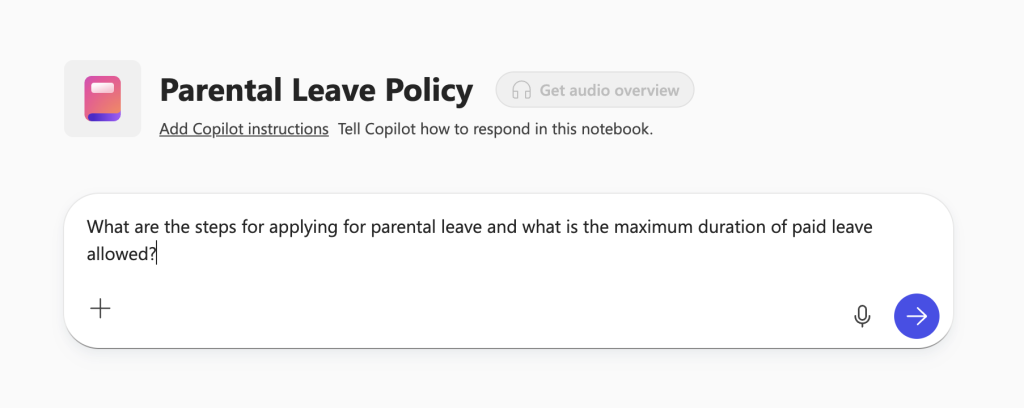
1. Eliminating Repetitive HR Queries: A Human Resources department curates a central Copilot Notebook containing all HR policies, benefits, and handbooks.
- Before Notebooks (Reactive/Synchronous Communication): An employee emails the HR manager, asking for the parental leave policy. The HR manager (wanting to offer excellent support to their internal customers) will often switch away from more important tasks—or have a hard time getting to them at all— to search and respond, contributing to their stress and distraction.
With Notebooks (Proactive/Asynchronous Communication): The employee opens the HR Notebook in Copilot and queries, “What are the steps for applying for parental leave and what is the maximum duration of paid leave allowed?” The Notebook instantly returns a concise, accurate answer. The HR manager remains focused on their most important work, preventing a constant flow of low-value interruptions.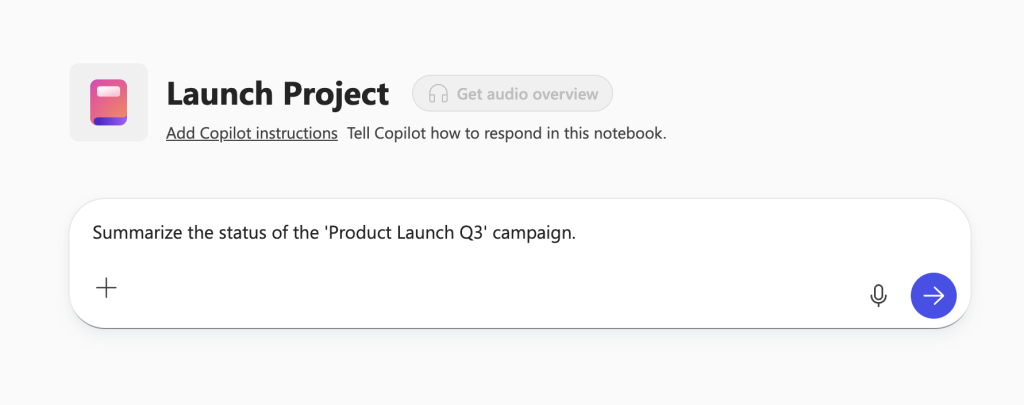
2. Streamlining Project Status and Historical Data: A central Project Notebook houses all project specifications, goals, timelines, and documented historical decisions.
- Before Notebooks (Reactive/Synchronous Communication): A team member needs goals or historical context. They send an email to the project lead, or a chat to the project thread in Teams, which typically notifies everyone on the team. Team members get constantly bombarded with these types of messages, foregoing deep, meaningful work to search for data “hidden” in inaccessible files but needed by others.
- With Notebooks (Proactive/Asynchronous Communication): The team member queries the Notebook: “Summarize the status of the ‘Product Launch Q3’ campaign,” or “What risks caused the 2022 team to decide against Feature X?” The Notebook instantly retrieves the necessary, organized information. The inquiring team member moves their work forward independently, saving the rest of the team from the constant interruptions.
Why Copilot Notebooks Is a Game-Changer

This intentional design for information retrieval allows team members to build “brainpower momentum,” dedicate time to “deep work,” and focus on significant results, rather than trying to chase down information from other employees, interrupting their proactive work in the process.
By reducing constant communication, this structured approach enables employees to be thoughtfully proactive rather than haphazardly reactive. Learn more about how to use Copilot Notebooks here.
Enterprise Security

That said, although Copilot can be set by administrators to search the web, many organizations turn off this functionality for enterprise security reasons. It may be wise to instruct team members to use Microsoft’s Copilot Notebooks only for internal work.
To build notebooks with external web content in order to perform tasks such as learning a new skill, or gathering select information from a large data source that’s not proprietary, Google’s NotebookLM is a similar option.
Integrating Microsoft Copilot Notebooks into your business operations can be a great step toward curbing distractions so that you can build a workplace in which everyone wants to work.
Empower Your Productivity With Copilot Training

As a leader, your ultimate goal is to clear the roadblocks so that team members can more easily accomplish their most important priorities, and end each day thinking, “That was such a great day—I got so much done!” Achieving this requires clarity regarding workflow, boundaries, and priorities.
My work is built on teaching individuals and leaders a collection of habits and behaviors needed to organize all the details of their personal and professional lives, so they can unleash their genius and achieve more. I am now offering specialized Copilot training as an add-on to my foundational Empowered Productivity training.
Once you and your team understand the fundamental principles of how to accomplish more with less stress—the importance of asynchronous communication, defining productivity as results, and making information self-serve—we can help you effectively implement these principles by leveraging the new AI tools built into the programs you already use every day.
This training will allow you to fully leverage modern technology in service of intentional, focused work, turning fragmented knowledge into a valuable, accessible, and queryable asset.